
Quick Wiki Link Adder for GitHub
Overview
The Quick Wiki Link Adder for GitHub is a streamlined browser extension designed to simplify the process of adding article links to a wiki repository on GitHub. It targets developers, technical writers, and content contributors who frequently manage documentation within GitHub-hosted wikis. By reducing manual steps, the tool helps users insert hyperlinks into wiki pages with minimal effort, improving workflow efficiency during documentation updates.
The extension operates directly within the Chrome browser, integrating seamlessly into the GitHub interface. Its primary function is to allow users to quickly generate and insert formatted links to articles—such as blog posts, technical guides, or project updates—into wiki pages. This is particularly useful when maintaining project documentation that requires frequent updates or references to external content.
While the developer information is not publicly available, the tool’s design suggests a focus on utility and simplicity, aligning with common needs in developer communities. It is ideal for individuals managing open-source projects, internal documentation, or knowledge bases hosted on GitHub. The extension does not require installation beyond the standard browser add-on process, making it accessible to users of varying technical backgrounds.
Key Features & Capabilities
- One-click link insertion – Users can select any article URL and instantly generate a formatted link for insertion into a GitHub wiki page.
- Auto-formatted markdown syntax – The extension automatically generates clean, valid markdown code for wiki links, reducing errors in documentation.
- Context-aware integration – Works directly within the GitHub wiki editing interface, preserving the user’s workflow without requiring context switching.
- Minimal user input required – No need to manually write or copy-paste markdown syntax; the tool handles formatting automatically.
- Compatibility with GitHub wiki structure – Designed to function with standard GitHub wiki pages, supporting both single and multi-page documentation systems.
For example, a developer updating a project’s documentation can highlight a relevant article in their browser tab, click the extension icon, and have the link inserted directly into the wiki editor. This eliminates the need to manually format the markdown or navigate between tabs. The feature is especially beneficial when adding multiple links across several wiki pages during a documentation sprint.
User Interface, Workflow & Performance
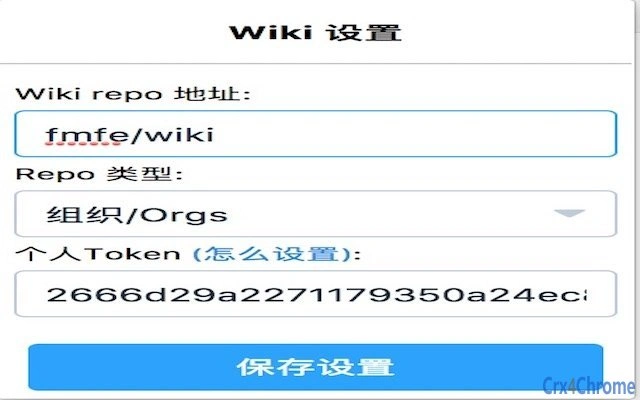
The user interface of the Quick Wiki Link Adder for GitHub is intentionally minimal, aligning with Chrome extension design standards. It presents a single icon in the browser toolbar, which activates when the user is on a GitHub wiki page. Upon clicking, a small pop-up appears with a field to confirm the link source and a button to insert the formatted markdown.
Navigating through the extension’s workflow is straightforward: users open a target article, click the extension icon, and confirm the insertion. The process is designed to be intuitive, requiring no prior training or configuration. The tool does not introduce additional layers or complex settings, maintaining a focus on speed and simplicity.
Performance observations are based on general software behavior patterns. The extension operates in the background with low overhead, and no specific resource usage details were provided. The developer did not specify CPU or RAM behavior during operation. Stability appears consistent with standard browser extensions, though real-world testing data was not included.
Compatibility & System Requirements
The extension is compatible with Windows, Mac, and Linux operating systems, ensuring broad accessibility across development environments. It is designed to work with the Chrome browser, which is required for full functionality.
Version 1.0.0 was released on August 15, 2024, and the installation size is 2.5 MB. The developer did not specify additional system requirements, such as minimum RAM or processor speed. Exact performance details were not provided. Compatibility information was partially provided, focusing on operating systems and browser support.
Pros and Cons
Pros
- Fast and efficient link insertion for GitHub wiki pages
- Automatically generates correct markdown syntax
- Simple, clean interface with minimal user interaction
- Free to use with no hidden costs
- Works across multiple operating systems
Cons
- No offline functionality available
- Requires Chrome browser for operation
- Limited customization options for link formatting
- No built-in history or template management
- Developer details not publicly available
FAQ Section
Is the Quick Wiki Link Adder for GitHub compatible with all browsers?
The extension is designed to work exclusively with the Chrome browser. Compatibility with other browsers has not been confirmed.
Can I use this tool without an internet connection?
Offline usage is not supported. The extension requires an active internet connection to access the current webpage and generate links.
Does the extension collect user data?
The developer did not provide information on data collection practices. Users are advised to review the extension’s permissions and privacy policy before installation.
How often are updates released?
Update frequency is not specified. The current version is 1.0.0, released on August 15, 2024.
Is this extension safe to install?
As with any browser extension, users should ensure they install it from a trusted source. The extension is free and does not require payment.
Final Thoughts
The Quick Wiki Link Adder for GitHub delivers a focused, reliable solution for developers and technical contributors who regularly update documentation in GitHub wikis. Its ability to automate the insertion of formatted links significantly reduces friction in content creation, especially during high-volume documentation tasks. While it lacks advanced features like templates or history tracking, its core functionality is executed with precision and speed.
For teams managing open-source projects or internal knowledge bases, this tool offers a practical boost in productivity. Its cross-platform support and zero cost make it accessible to a wide audience. The lack of developer transparency is a minor concern, but the extension’s simplicity and clear purpose mitigate this risk.
Download Quick Wiki Link Adder for GitHub now.







